Kit for Adult Children & Caregivers

The Elderly Parent & Caregiver Outage Kit

Keep your parent powered, warned, and reachable in an outage without asking them to learn a single new device.

Why generic advice fails here

The buyer is you. The user is an elderly parent who needs every device to work without setup, menus, or a smartphone.

The four-layer stack

Every layer has one job. Lose one and the chain breaks.

  1. 1
  2. 2
  3. 3
    LocalCoordinate on the ground
  4. 4
    FallbackReach out when all else fails

Built for you if

  • Adult children setting up a parent who lives alone or far away
  • Caregivers of a parent who depends on a CPAP, oxygen concentrator, or other powered medical device
  • Families who need their parent reachable without a smartphone or a monthly plan to manage
  • Anyone whose parent will not learn a new app, menu, or button sequence under stress

Look elsewhere if

  • Tech-comfortable households building their own layered plan from scratch
  • Caregivers who want a single magic gadget instead of matching gear to a real medical need
  • Off-grid or field-comms enthusiasts looking for range and capability over simplicity
  • Anyone who will buy the gear but never plug it in, charge it, or test it once with the parent

The constraints that decide everything

Generic checklists ignore these. Every pick below is chosen around them.

01

Simplicity beats capability

The best device for an elderly parent is the one that needs zero decisions in the moment. A radio with fifty channels and a programming cable is worse than a pair that already works on one button. Choose the gear that does less but does it without help, and do all the setup yourself before it ever reaches them.

02

A powered medical device cannot be skipped

If your parent runs a CPAP, an oxygen concentrator, or a medication refrigerator, the outage plan starts and ends with keeping that device alive. Match the power source to the medical device first, confirm the watts, and confirm the inverter is pure sine wave. Everything else in the kit is secondary to the one thing that has to stay on.

03

No new habits

Anything that depends on your parent remembering to charge a bank, open an app, or check a screen will fail on the night it matters. Favor gear that lives plugged in, alerts on its own, and fails over to battery without a single button press. The kit should work whether or not your parent does anything at all.

04

Remote reassurance is the point

You are not in the house. The kit succeeds when it lets you confirm your parent is safe and lets your parent reach you or rescue services without finding your number, unlocking a phone, or explaining where they are. One button to talk to you, one button for an emergency that broadcasts a location.

If you buy three things

3 picks
Alert layer

Best Alert Layer

8.0
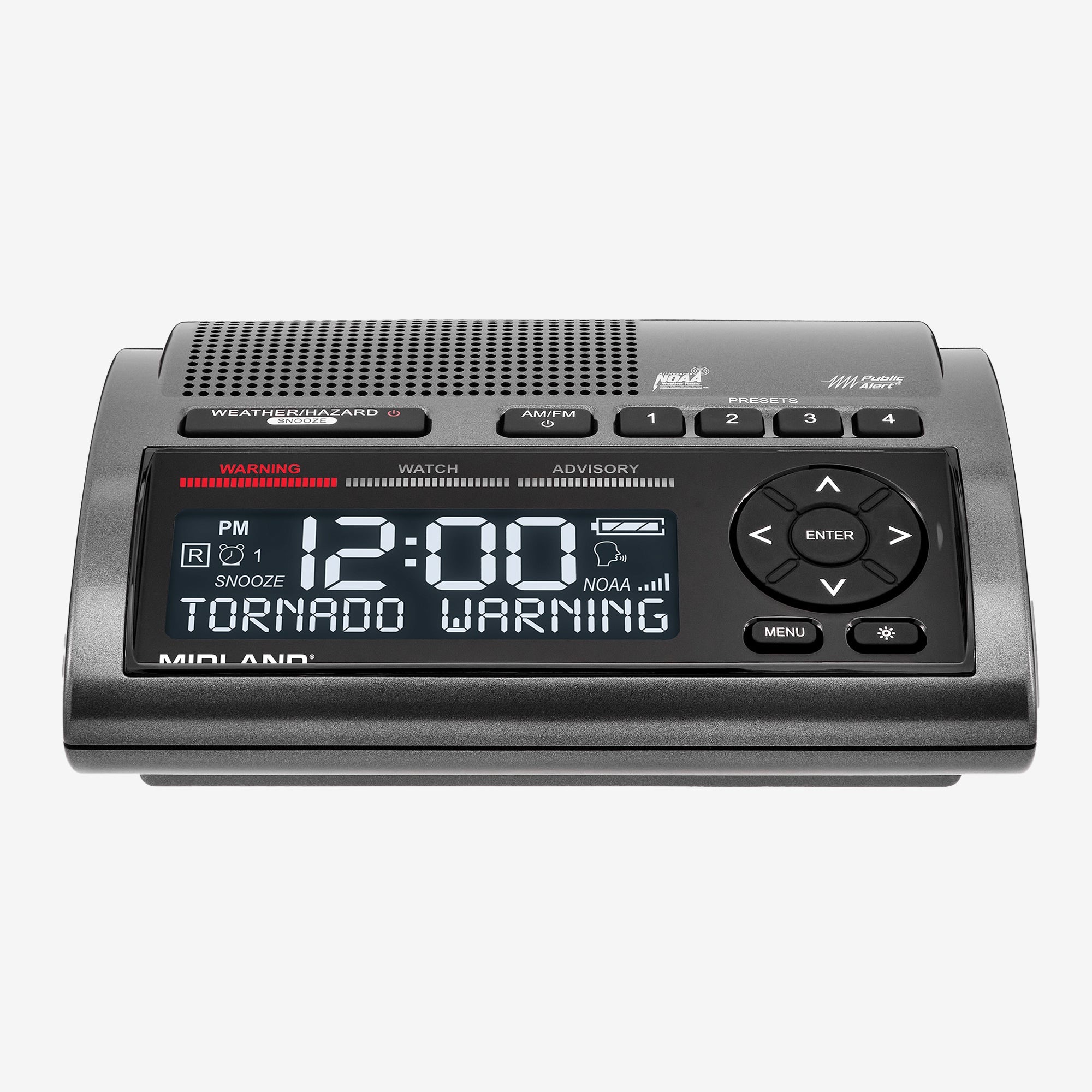
The alert layer that does the watching so your parent does not have to. It stays plugged in by the bed, pulls NOAA weather and civil emergency broadcasts on its own, and wakes the room with a voice announcement, a flashing light, and a siren when the home county is under warning. Four AA cells keep it alerting straight through a power outage, which is exactly when it earns its place. Program the county code once for them and it asks nothing of them again.
Buy on Amazon
Power layer

Best Power Layer

9.0

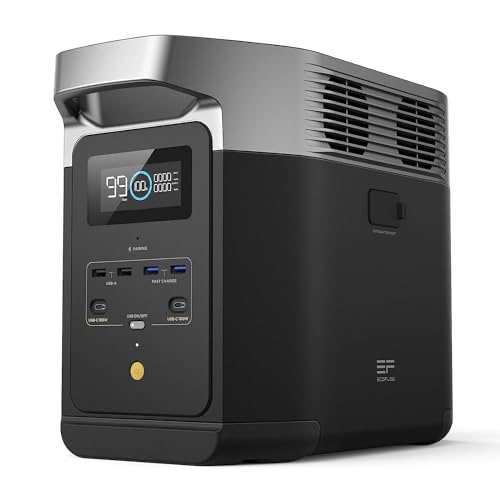
This is the whole ballgame for a medical-dependent parent. The DELTA 2 puts out pure sine wave power at 1800W continuous and 2700W surge, which is what a CPAP machine and most home oxygen concentrators need to run safely, and the manufacturer rates it for exactly that use. Its 1024Wh battery carries a typical CPAP through fifteen to twenty hours on one charge, with outlets to spare for a lamp, a phone, and a medication fridge. Charge it, leave it plugged in by the bed, and the only action required is pressing one button.

Buy on Amazon
Fallback layer

Best Fallback Layer

8.0

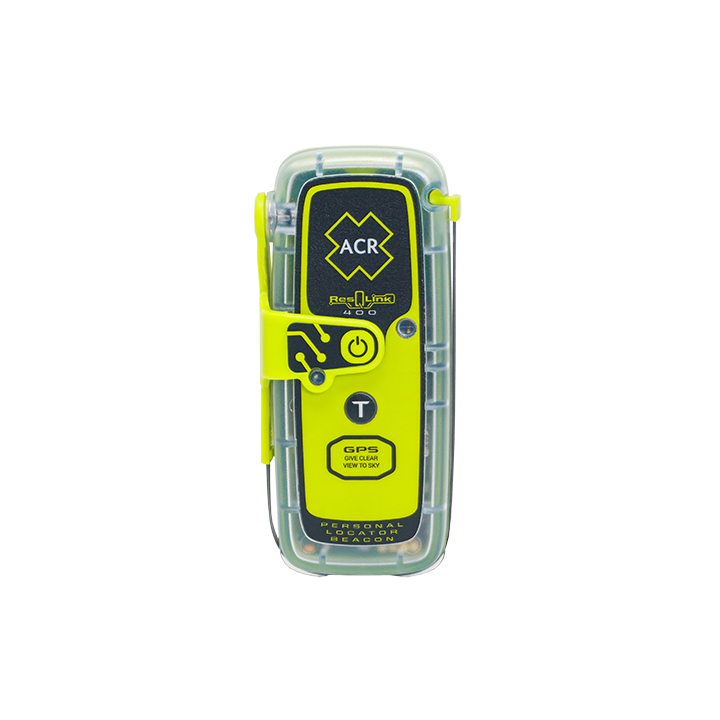
The last resort that needs no plan, no phone, and no monthly bill. The ResQLink 400 is a personal locator beacon with one protected SOS button: lift the cover, press, and it broadcasts your parent's GPS location to search and rescue over the global satellite network. There is no subscription to lapse and no app to fail. It is waterproof with a long-life battery, so it can live in a go-bag or a coat pocket for years and still fire when it is finally needed. Keep it for genuine emergencies, not check-ins.

Buy on Amazon

The full kit, layer by layer

Every component, grouped by the job it does in the stack.

Alert

Best Alert Layer

Midland WR400 Deluxe NOAA Weather Alert Radio with SAME Localized Programming, 80+ Emergency Voice & Flashing Alerts, Alarm Clock/AM-FM Radio
Weather Alerts:
Yes
Battery Life:
SOS Button:
No
Buy on Amazon
$1008.0 / 5
Power

Power Station

Best Power Layer

EF ECOFLOW Portable Power Station DELTA 2, 1024Wh LiFePO4 (LFP) Battery, 1800W AC/100W USB-C Output
Max Power:
1800 W
Battery Life:
Water Resistant:
No
Buy on Amazon
$4499.0 / 5

Cpap Battery

Hands-Off CPAP Backup

Medistrom Pilot-24 Lite CPAP Battery Backup Power Supply, 95Wh, for ResMed AirSense 10, AirMini, S9, and compatible 24V CPAP/APAP devices (bundled with cables)
Battery Life:
8 hrs
Renter Install:
no install
Building Fit:
bedside
Buy on Amazon
$3398.0 / 5
Local

Best Simple Local Pair

Midland GXT1000VP4 GMRS Radio Pair
Max Power:
5 W
Channels:
50
Clear LOS Range:
36 mi
Buy on Amazon
$657.8 / 5
Fallback

Best Fallback Layer

ACR ResQLink 400 GPS Personal Locator Beacon
2-Way Messaging:
No
SOS Button:
Yes
Subscription Required:
No
Buy on Amazon
$3008.0 / 5

Build it in this order

You do not need everything at once. Start at the top and work down.

  1. 1

    Match the power to the medical device first

    Start with whatever device cannot go dark. Write down its wattage and confirm it needs pure sine power, then size the DELTA 2 to carry it overnight. If your parent uses a CPAP, add the Pilot-24 Lite in-line so the machine fails over to battery on its own. This layer comes before anything else because it is the one with a hard medical consequence.

  2. 2

    Set up the local loop for them, not with them

    Do the work your parent should never have to. Program both radios to one channel, label the talk button, charge them, and pair the NOAA radio's county code so it self-alerts. Hand over devices that already work. Then test the radio path between your homes once together so the first real use is not the first test.

  3. 3

    Add a no-subscription fallback last

    Once power and the local loop are handled, add the ResQLink 400 as the emergency trigger that survives everything else. No plan to renew, no phone to charge, no menu to navigate. Show your parent the cover-and-press motion one time, store it somewhere obvious, and leave it there. It is insurance you hope is never opened.

Questions this persona always asks

What is the single most important thing in this kit?
The power station, if your parent depends on a powered medical device. A CPAP, an oxygen concentrator, or a medication refrigerator turns an outage from an inconvenience into a medical event. The DELTA 2 delivers pure sine wave power rated for that equipment, runs a typical CPAP fifteen to twenty hours on one charge, and needs nothing from your parent beyond one button. If there is no medical device, start with the NOAA alert radio instead.
Will the power station actually run a CPAP or oxygen concentrator safely?
Yes, and that is the reason it is in this kit instead of a cheaper inverter. Sensitive medical equipment needs pure sine wave power, not the modified or stepped output that many cheap units produce. The DELTA 2 puts out pure sine at 1800W continuous and 2700W surge, and the manufacturer rates it for medical devices in that range. Confirm your specific machine's wattage on its label, since high-flow oxygen concentrators draw more than a CPAP, but a standard CPAP uses a small fraction of the battery.
My parent will not learn a new device. How simple is this really?
That is the design constraint, not an afterthought. You do all the setup. The NOAA radio alerts on its own once you program the county code. The CPAP battery fails over automatically with no button press. The power station and the radio each work on a single button you can label. The SOS beacon is one protected button under a cover. Nothing here requires a smartphone, an app, a menu, or a monthly login your parent has to remember.
How does my parent reach me if the phones are down?
Through the radio pair. You keep one unit and your parent keeps the matching one, both pre-programmed by you to the same channel. Reaching you takes one held button and your voice, with no dialing and no contact list. It is short-range, so it works best when you live nearby or are coming to them. For a true life-threatening emergency where no one is in range, the ResQLink 400 broadcasts their location to rescue services with one button and no subscription.
Do I need to pay a monthly subscription for any of this?
No. The whole kit is built to avoid recurring costs and lapsed plans, because a subscription that expires is a failure waiting to happen for a parent who will not manage it. The NOAA radio, the power station, the CPAP backup, the radio pair, and the SOS beacon all work without any monthly fee. The GMRS radios do require a one-time FCC license to transmit, which has a fee and a call sign but no exam, and you handle that for them.

Free printable checklist

The Caregiver's Reach-Them Checklist

A printable one-page checklist for the caregiver who set the kit up: the medical-device wattage and runtime, the pre-programmed radio channel and call sign, the NOAA county code, the SOS beacon location, and the one test you run with your parent before you need any of it.

Not quite your situation?

These kits start from a different constraint.