Kit #1 for Renters & Condos

The Apartment & Condo Outage Kit

Stay reachable from a shared building when the power, the elevators, and the cell signal all give out at once.

Why generic advice fails here

Concrete walls, no drilling, and one room that has to stay online.

The four-layer stack

Every layer has one job. Lose one and the chain breaks.

  1. 1
  2. 2
    PowerKeep the stack alive
  3. 3
    LocalCoordinate on the ground
  4. 4
    FallbackReach out when all else fails

Built for you if

  • Renters who cannot drill holes, mount exterior antennas, or touch the roof
  • Condo owners and HOA boards building a shared lobby-to-floor plan
  • Families spread across floors who need a stairwell and lobby check-in plan
  • Anyone in a concrete or steel building where indoor signal already struggles

Look elsewhere if

  • Off-grid homesteads with a roof, a tower, and a generator already in place
  • People who want a single magic device instead of a layered plan
  • Households that will never charge, test, or practice with the gear
  • Survivalists looking for long-range field comms over building coordination

The constraints that decide everything

Generic checklists ignore these. Every pick below is chosen around them.

01

Concrete crushes the box numbers

Reinforced concrete, elevator cores, metal doors, and coated glass cut radio range far below the miles printed on the package. The only honest range is the route you actually use: unit to stairwell, stairwell to lobby, lobby to curb, and unit to the parking level. Test it before you need it.

02

No drilling, no roof, no exterior brackets

A renter setup has to be reversible. No holes, no exterior antenna mount, no cable path a landlord notices at inspection. That rules out most whole-home booster installs and pushes the kit toward window-side placement, handhelds, and a balcony sky view.

03

One room has to stay online

Do not scatter gear across three closets. Pick the one table or drawer near the window with the best signal and make it the command post. The power bank, weather radio, radios, cables, and the printed plan all live there so the kit still works when the building is dark.

04

Licenses and subscriptions come before the buy button

GMRS transmit use requires an FCC license in the US. Satellite messengers require a monthly plan. A NOAA-only starter path needs neither. Decide which costs you are willing to carry before you buy, and write the GMRS call sign into the printed plan.

If you buy three things

3 picks
Alert layer

Best Alert Layer

8.3
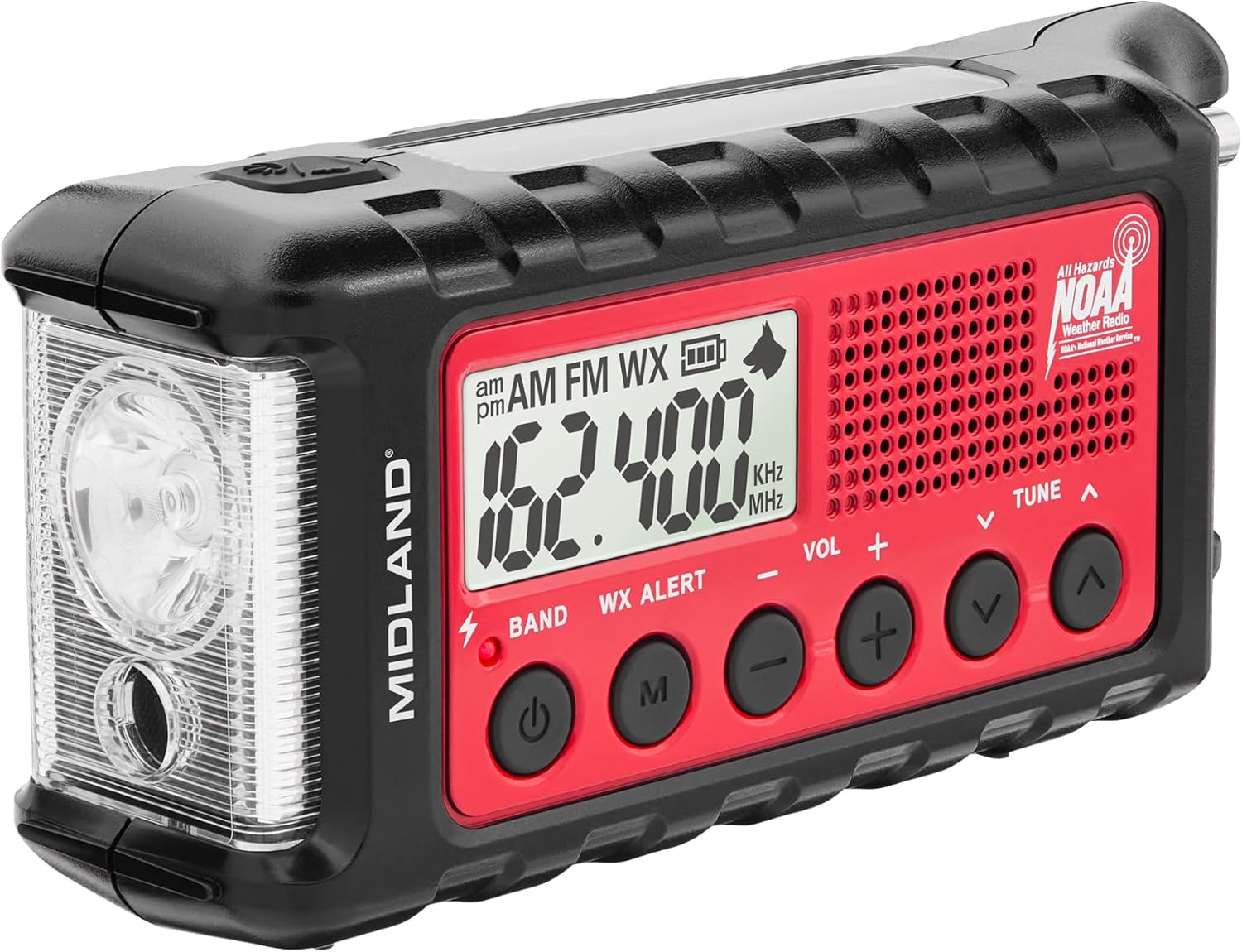
The cheap alert layer every apartment kit should have. It pulls NOAA weather and emergency broadcasts without a phone, carrier signal, or subscription, and the hand-crank plus solar charging keep it alive when everything else is dead. It answers the first question of any outage: local building problem, city grid event, or storm with official warnings.
Buy on Amazon
Power layer

Best Power Layer

8.4

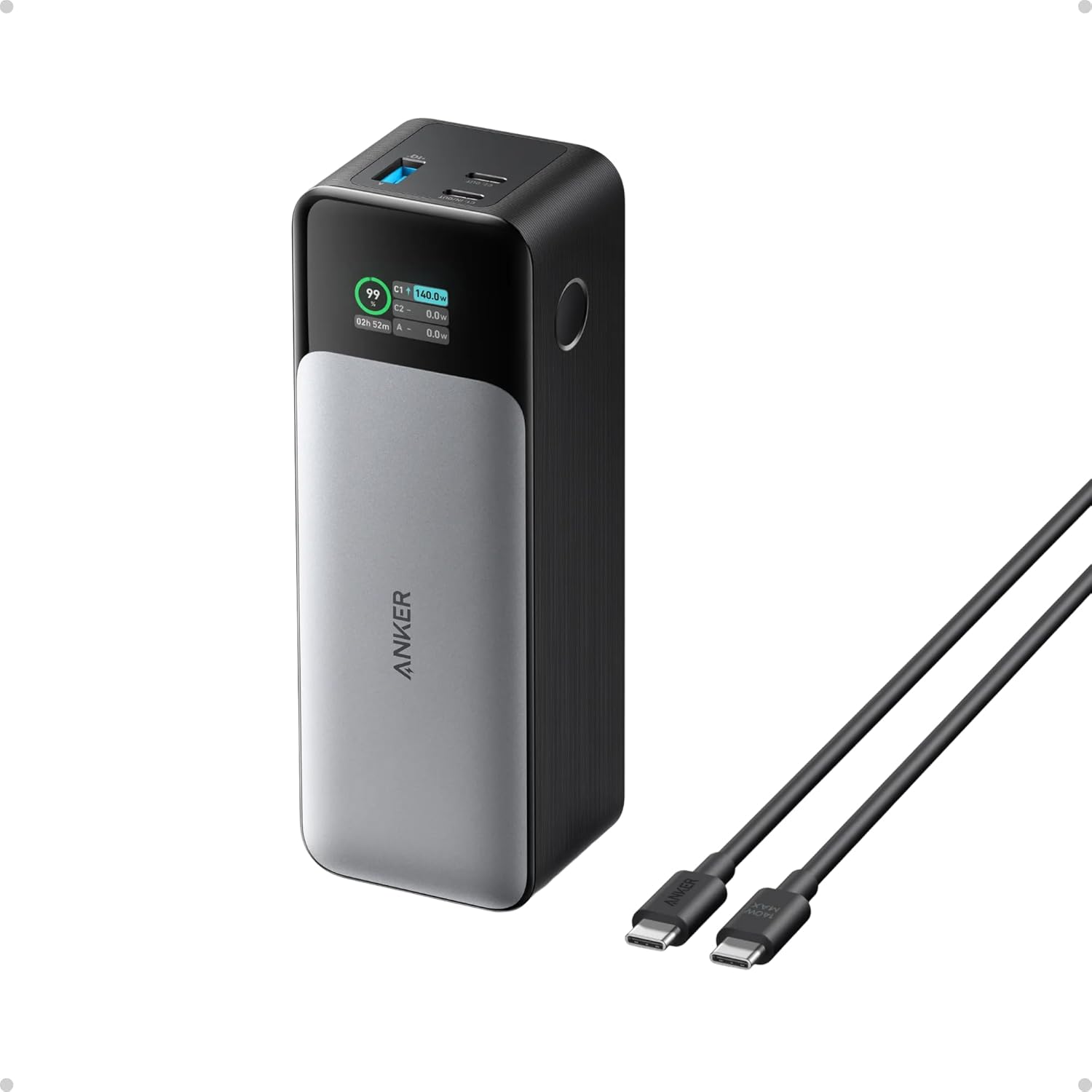
The power layer that makes the rest of the kit usable. A radio plan fails the moment phones, satellite messengers, and USB-C radios go dead. The 24K capacity and 140W output top off a command-post phone and a laptop, and the display makes the charge state obvious. Keep it charged in the same drawer as the written plan.

Buy on Amazon
Fallback layer

Best Fallback Layer

8.8

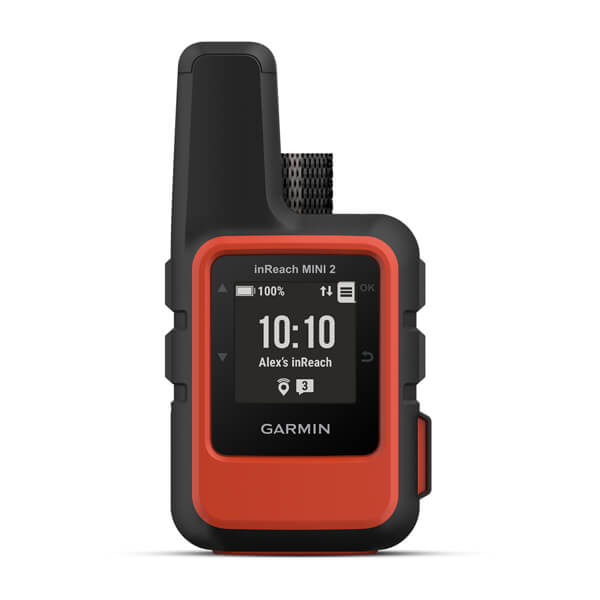
The premium last-resort layer. Two-way satellite messaging, an SOS button, and location sharing when cell networks fail, in a body small enough for a go-bag. It belongs in the kit when a balcony, roof, courtyard, or evacuation route gives you enough sky view. Tall buildings can block the view, so test a non-emergency message before storm season.

Buy on Amazon

The full kit, layer by layer

Every component, grouped by the job it does in the stack.

Alert

Best Alert Layer

Midland ER310 Emergency Crank Weather Radio
Weather Alerts:
Yes
Battery Life:
32 hrs
SOS Button:
Yes
Buy on Amazon
$708.3 / 5
Power

Best Power Layer

Anker 737 Power Bank PowerCore 24K
Battery Life:
24 hrs
Max Power:
140 W
Buy on Amazon
$1508.4 / 5
Local

GMRS radios

Best Simple Local Pair

Midland GXT1000VP4 GMRS Radio Pair
Max Power:
5 W
Channels:
50
Clear LOS Range:
36 mi
Buy on Amazon
$657.8 / 5

Technical Building Radio

BTECH GMRS-V2 Handheld Radio
Max Power:
5 W
Channels:
30
Clear LOS Range:
40 mi
Buy on Amazon
$708.0 / 5

Rugged Evacuation Radio

Rocky Talkie 5 Watt GMRS Radio
Max Power:
5 W
Channels:
22
Clear LOS Range:
40 mi
Buy on Amazon
$1758.5 / 5

Condo Command Post Radio

Midland MXT275VP4 15W GMRS MicroMobile Radio
Max Power:
15 W
Channels:
15
Clear LOS Range:
50 mi
Buy on Amazon
$1508.1 / 5

Cell signal boosters

Window-Side Signal Booster

weBoost Home Studio Cell Signal Booster
Building Fit:
one room
Renter Install:
window route
Coverage:
3000 sq ft
Buy on Amazon
$2508.2 / 5

Condo Owner Booster Upgrade

weBoost Home MultiRoom Cell Signal Booster
Building Fit:
large condo
Renter Install:
permission likely
Coverage:
5000 sq ft
Buy on Amazon
$4708.0 / 5

Value Booster With Permission

SureCall Flare 3.0 Home Cell Signal Booster
Building Fit:
multi-room
Renter Install:
permission likely
Coverage:
3500 sq ft
Buy on Amazon
$3007.7 / 5

Strict No-Drill Booster

SureCall EZ 4G Plug-and-Play Cell Phone Signal Booster
Building Fit:
one room
Renter Install:
window plug-in
Coverage:
2000 sq ft
Buy on Amazon
$3997.1 / 5

Gmrs Repeater

Condo Repeater Hub

Retevis RT97S Portable GMRS Repeater
Max Power:
5 W
Channels:
8
Building Fit:
licensed RF relay
Buy on Amazon
$3408.2 / 5
Fallback

Best Fallback Layer

Garmin inReach Mini 2 Satellite Communicator
2-Way Messaging:
Yes
SOS Button:
Yes
Subscription Required:
Yes
Buy on Amazon
$3508.8 / 5

Phone-First Satellite Fallback

ZOLEO Global Satellite Communicator
2-Way Messaging:
Yes
SOS Button:
Yes
Subscription Required:
Yes
Buy on Amazon
$2008.1 / 5

No-Subscription Rescue Beacon

ACR ResQLink 400 GPS Personal Locator Beacon
2-Way Messaging:
No
SOS Button:
Yes
Subscription Required:
No
Buy on Amazon
$3008.0 / 5

Build it in this order

You do not need everything at once. Start at the top and work down.

  1. 1

    Start with the command post and the alert layer

    Pick one table or drawer near the window with the best signal. Put the power bank and the NOAA weather radio there first. That single spot, plus the ability to receive alerts without a phone, is the foundation everything else stacks on.

  2. 2

    Add a local radio plan

    Set a GMRS plan for family, neighbors, lobby staff, and the stairwell route. Buy the simple pair for most households, or the technical handheld and base radio if a building captain will program channels. Test the real path before an outage and write the channel plan and call sign next to the radios. If a shared repeater enters the plan, assign a responsible licensed operator and keep written operating rules for station identification, permissions, and who is allowed to transmit.

  3. 3

    Preserve one phone link if a window has signal

    If one window gets usable outdoor signal, a no-drill booster can keep a command-post phone alive. Register the booster with the carrier, follow provider consent rules, and make sure the window unit and indoor antenna can be separated properly. Skip it if Wi-Fi calling already works on backup power, or if towers are fully down. Boosters only help with weak indoor signal, not a dead carrier network, and boosted 911 calls can have less reliable location data.

  4. 4

    Add a satellite fallback only if you have sky

    If your balcony, roof, courtyard, or evacuation route has a workable sky view, add a satellite messenger or rescue beacon as the last resort. Decide between two-way messaging and a no-subscription beacon, then test a non-emergency message before storm season.

Questions this persona always asks

Do I really need all four layers in an apartment?
No. Start with the alert and power layers, since they are cheap and useful in every outage. Add a local radio plan if you have family or neighbors to coordinate with, a booster only if one window has usable signal, and satellite only if you have a real sky view. The four layers are a menu of failure modes, not a mandatory shopping list.
Will GMRS radios actually reach through concrete?
Far less than the box claims. Reinforced concrete, elevator cores, and metal doors crush range. The honest test is the route you care about: unit to stairwell, stairwell to lobby, lobby to curb, and unit to the parking level. Test it before an outage and plan around the floors you can actually cover, not the miles on the package.
Does a cell booster work during a full power or tower outage?
Only partly. A booster amplifies weak outdoor signal into one room; it does nothing when the carrier network itself is down. It helps the common apartment case where concrete and crowded networks make a phone nearly useless inside while a window still gets signal. For a total outage, the radio and satellite layers carry the plan.
Will a satellite messenger work from inside my apartment?
Usually not from the center of a high-rise. Satellite devices need a clear sky view, so they work from a balcony, roof deck, courtyard, sidewalk, or evacuation route. A north-facing balcony under an overhang may be worse than walking down two flights to the courtyard. Identify your spot before you rely on it.
Do I need a license or subscription for any of this?
GMRS transmit use requires an FCC license in the US. There is no exam, but there is a fee and a call sign you should write into the printed plan. Satellite messengers require a monthly subscription, while the NOAA weather radio and the no-subscription rescue beacon need neither. Decide which ongoing costs you will carry before you buy.

Free printable checklist

The Apartment Outage Comms Checklist

A printable one-page checklist for the command post, the GMRS channel plan, the lobby and stairwell check-in schedule, and the balcony satellite test. Built to live next to the kit, not in a forgotten folder.

Not quite your situation?

These kits start from a different constraint.